
Getting Started in PETS Pony Land
First-hour checklist for species, inventory, explore, and your first saved look.
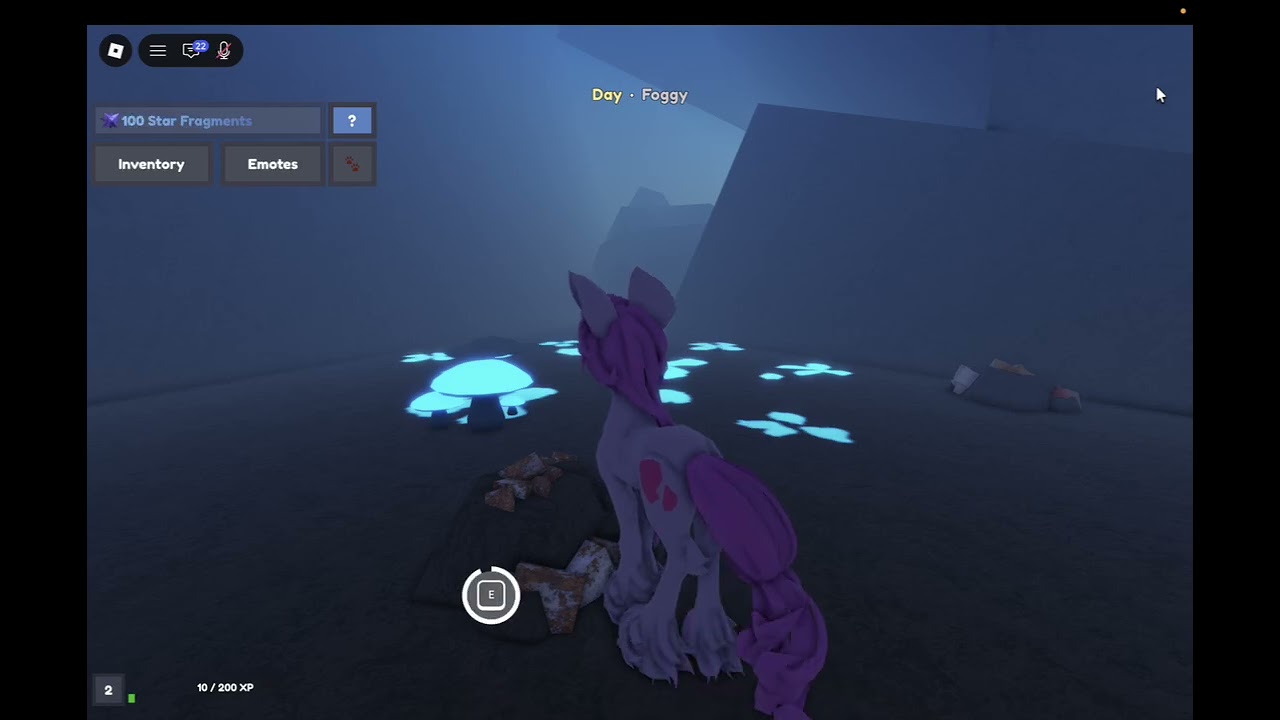
PETS! Pony Land is an MLP-inspired Roblox experience by Faded Horizons where you design a pony, explore the world, gather resources, craft rare items, and hang out with other players. The game has been in BETA since 2026-07-27, runs online servers sized for groups up to about twenty players, and already sits around the 1.3 million visit mark. This guide is your first-hour checklist: join cleanly, pick a species with intent, learn inventory, explore without getting lost, gather what the map offers, and save a look you will actually reuse.
If you only remember three habits, make them these: open inventory early, save before big experiments, and treat flowers and resource nodes as part of gameplay. For deeper systems after this page, use the Guides Hub, Species, Customization, Accessories and Crafting, and Controls and Emotes.
Before you press Play
- Confirm you are opening the correct place: PETS! Pony Land on Roblox.
- Use a stable connection. Customization UIs and save slots feel worse with heavy lag.
- Decide whether this session is for looks, exploration, or social hangouts. You can do all three, but a tiny goal keeps BETA sessions focused.
- Bookmark this wiki’s Codes page so you can check for real promos later—never trust random code lists in chat.
First-hour checklist
Minute 0–10: spawn, move, open inventory
Spawn in and test movement immediately. Walk a short loop, try camera angles, and open Inventory as soon as the UI allows. Inventory is the door to customization: body parts, eyes, manes, tails, patterns, accessories, hats, and animation styles live behind that panel. If you skip it, you will explore as a default pony and miss half the fantasy.
On PC, get comfortable with keyboard movement and mouse look. On mobile, practice thumb camera control before you enter dense decoration areas. For binding-style tips and emotes, jump to Controls and Emotes once you finish this checklist.
Minute 10–25: pick your first species
Choose Earth pony, Pegasus, or Unicorn. Each species changes silhouette and which animation options feel iconic—Pegasus wing styles, Unicorn horn presence, Earth pony grounded strength. None of them lock you out of customization forever; you can save up to three skins per species, so your first pick is a starting lane, not a permanent prison.
If you want a structured comparison before you commit, pause here and read Species. Otherwise pick the fantasy you care about most for screenshots and keep moving.
Minute 25–40: build a “good enough” first look
Do not chase perfection in hour one. Aim for a coherent coat, readable eyes, a mane/tail pair that matches your color story, and one accessory or hat if you already have something equipped. Note which menus feel crowded so you know what to re-visit. Full part lists, pattern mixing, and slot strategy live in Customization.
Save early. Overwriting a look you liked without a backup slot is the fastest way to regret a BETA session. Use slot 1 as your explorer default.
Minute 40–55: explore and gather
Leave the spawn comfort zone. Walk (or glide, depending on species fantasy) toward landmarks, resource spots, and flower areas. The official description is clear: explore the world to gather resources and craft rare items, and flowers are not empty scenery—they have a purpose in-world. Pick up what you can, watch how inventory fills, and avoid crafting everything instantly. Stockpile first so you understand recipes and rarity later.
When you are ready for gather routes, crafting priorities, accessory fit, and flower purpose in detail, open Accessories and Crafting.
Minute 55–60: emote, screenshot, plan session two
Try at least one emote, swap an idle or tail style if available, and take a screenshot of your saved look. Session two goals should be concrete: unlock another accessory, fill save slot 2 with a contrasting palette, or map a better gather loop. Check Updates if the UI changed since this guide was written.
Inventory habits that save you later
- Open inventory whenever you obtain something new; confirm it equipped or stored as you expect.
- Keep one “clean” look without busy accessories so you can judge coat patterns honestly.
- Mentally label save slots: daily, fancy, experiment.
- Do not delete materials until you understand crafting sinks.
- If a menu confuses you, leave it, explore five minutes, then return with fresh eyes.
Exploration tips for BETA maps
Pony Land rewards poking at edges. Look for elevation changes, decorative clusters, and areas where flowers or resources repeat. Online servers mean other ponies will crowd photogenic spots—use that as a landmark system. If you get turned around, return to a memorable structure, re-orient the camera, and spiral outward again. Gathering is a loop, not a single chest at the end of a linear path.
Social servers (up to about twenty players) are great for learning by watching. Ask what someone gathered, but verify advice against your own inventory. For community destinations and official links, see Links.
What not to stress in hour one
- Perfect rainbow gradients on every part.
- Filling all three save slots immediately.
- Crafting every rare recipe on first pickup.
- Comparing your pony to heavily edited thumbnails.
- Invented codes from unverified chat spam.
BETA content will expand. Your durable progress is taste, map memory, and material stockpiles. Looks can be rebuilt; confidence in the menus is what makes rebuilding fast.
After this guide
- Compare types in Species if you want a second species slot tonight.
- Push deeper into parts and patterns with Customization.
- Turn gathers into gear via Accessories and Crafting.
- Polish movement and social tools in Controls and Emotes.
- Return to the Guides Hub whenever you need the full index.
You do not need a perfect pony to enjoy Pony Land. You need a saved look, a little curiosity about the map, and the habit of opening inventory before you wander too far. Finish the checklist above, then let the sibling guides take over for depth.
Frequently Asked Questions
Quick answers to the most common questions.
What should I do first in PETS Pony Land?
Open Inventory, pick Earth pony, Pegasus, or Unicorn, build a simple coherent look, save it, then explore to gather resources and learn the map.
Can I change species later?
Yes. You can work with each species and save up to three skins per species, so your first choice is a starting lane rather than a permanent lock.
Why open inventory so early?
Customization, accessories, hats, patterns, and animation styles are reached through inventory. Exploring without it means you miss the core fantasy loop.
Do flowers matter or are they decoration only?
Flowers have a purpose in-world. Treat them as part of exploration and crafting progress—see Accessories and Crafting for details.
Where do I go after the first hour?
Read Species or Customization next, then Accessories and Crafting. Use Controls and Emotes when you want smoother movement and social expressions.